Data exposure checks for lenders & insurers

What isyourcompany.comleaking right now?

Leaks usually come from quote tools, staging sites and forgotten APIs, not from your main systems.

Free. Confidential. Read-only.

Firewalls stop attacks. Leaks aren’t attacks.Leaks sit in your app’s logic, not the traffic a firewall or CDN inspects. That’s true of every one, including ones you may already run:CloudflareAkamaiAWS WAFImpervaF5Check Point

Built for companies that hold other people’s financial data

Not another scanner

Scanners find bugs.
We find leaks
that aren’t bugs.

Most scanners look for weaknesses in your software.
We look for data your own site is already handing out.

What a typical security scanner reports

  • Outdated software versions
  • Open ports
  • Missing security headers
  • A long list of CVEs — known security holes — with many false alarms

What Luxero reports

  • The actual records your site is giving out
  • Whose data it is — customers, agents, or borrowers
  • Which fields, and roughly how many
  • Whether it was meant to be public or not
  • Each finding is verified before it goes in the report
  • Graded by what a regulator, plaintiff’s lawyer, or client would care about

They tell you a door is unlocked.
We tell you what already walked out.

Every item in the report looks like this: whose data, which fields, and whether it was meant to be public.

Example finding (sample report)

From the fictional Meridian Shore sample, not a real client.

High Unintended

Find-an-agent locator hands out CRM fields the page never shows

Where
.meridianshore.example
What it returned
  • crm_account_id
  • commission_tier
  • personal_mobile
  • home_address

1,734 producer records in one request · 12 field names in total

Login required
No
Meant to be public
No
Confirmed by
Luxero

Sample report excerpt

One report.
Plain English.

A grade, what leaked, every field name, and what to fix first. These pages are excerpts from a sample report for a fictional company. Your report is emailed to you, nobody else.

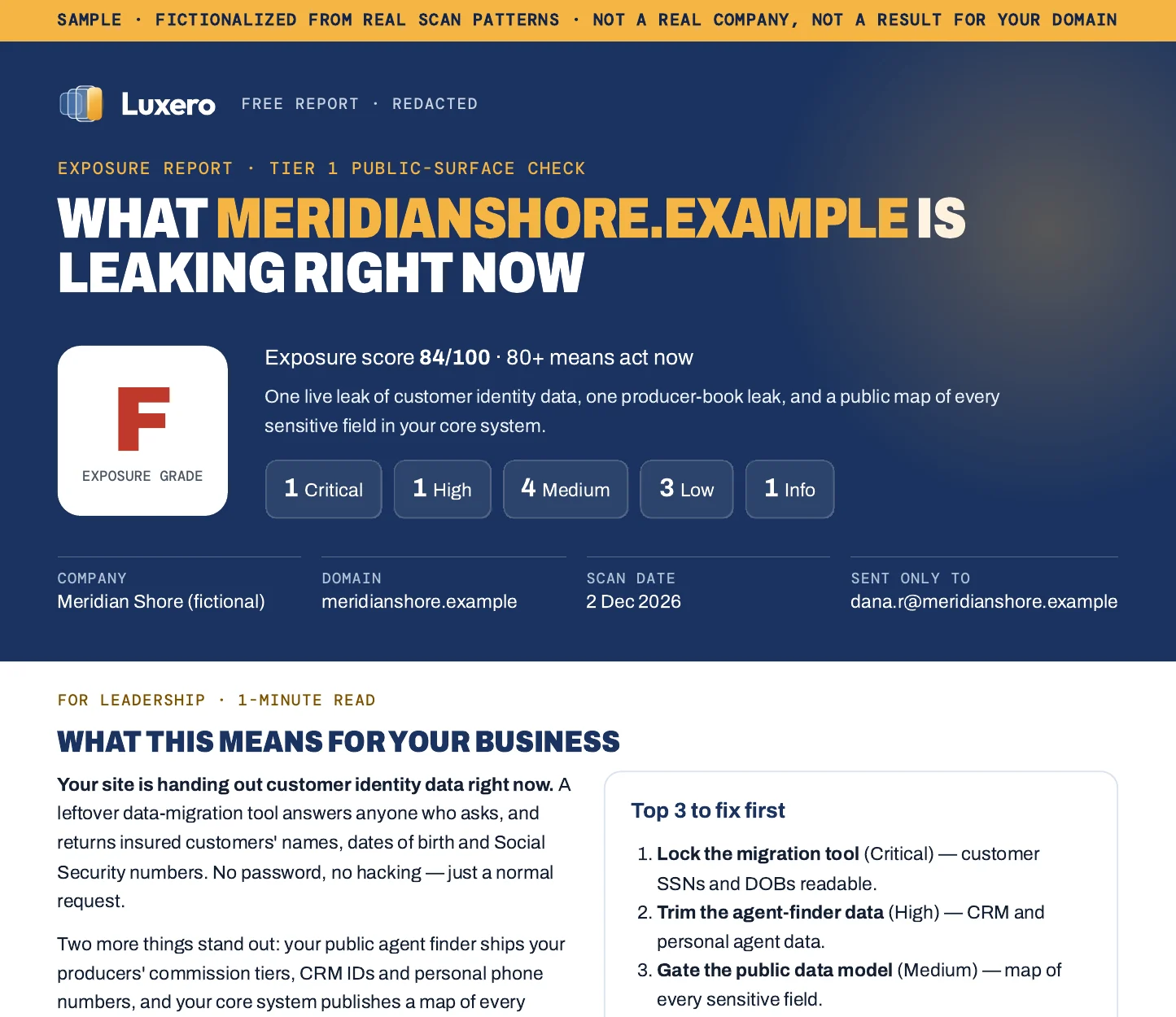
Page 1 of a sample Luxero free report for Meridian Shore (fictional): grade F, exposure score 84 out of 100, 1 critical, 1 high, 4 medium, 3 low and 1 info finding. Top 3 to fix first: lock the migration tool, trim the agent-finder data, gate the public data model.
Page 1 · Grade, finding counts and a 1-minute summary for leadership
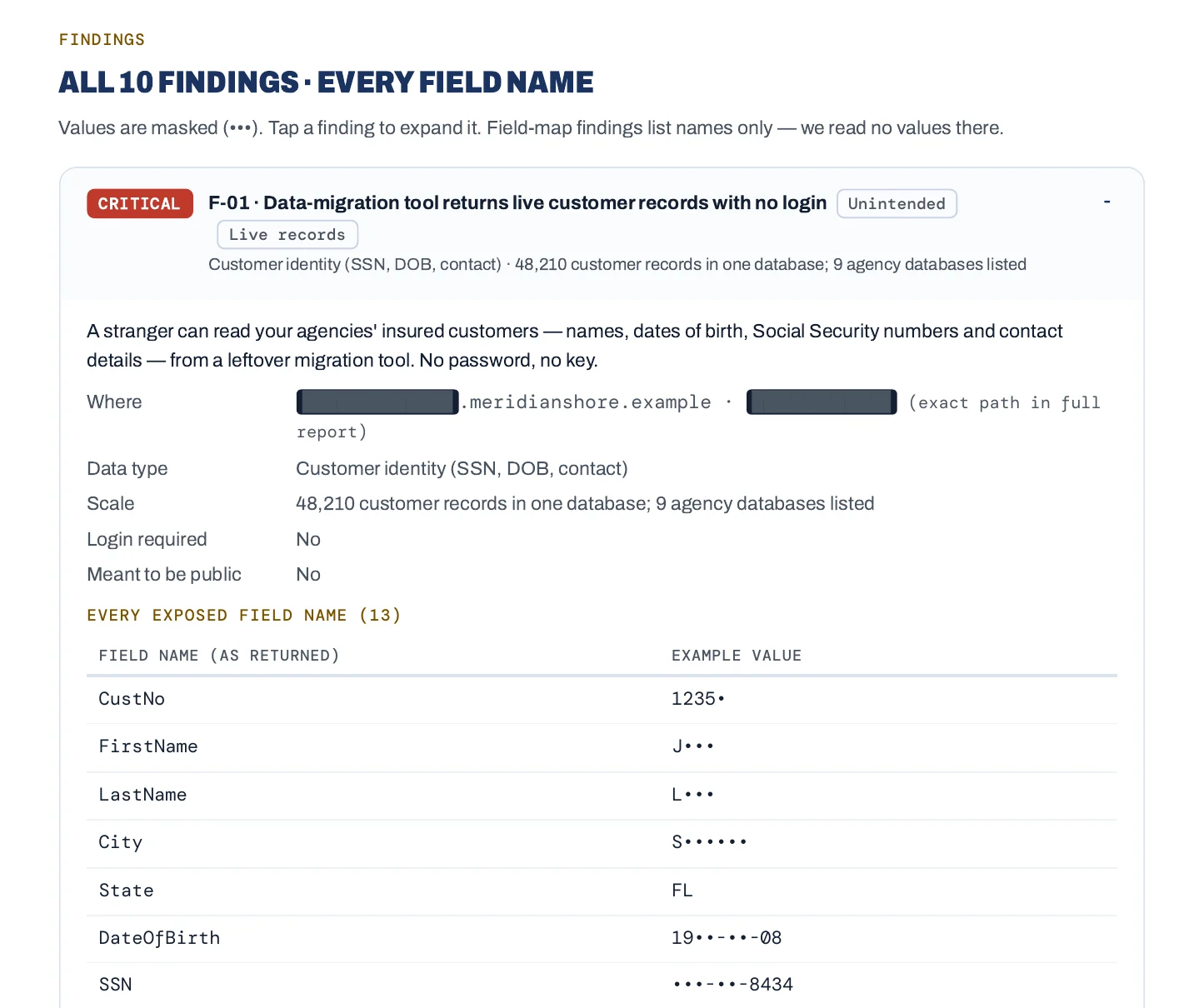
Page 4 of the same sample report: all 10 findings with every field name. Critical finding F-01, a data-migration tool returning live customer records with no login, lists 13 exposed field names such as FirstName, DateOfBirth and SSN, with values masked and the host redacted.
Page 4 · Every exposed field name, values masked, location redacted

Excerpt from a sample report. Meridian Shore is a fictional company built from real scan patterns; this is not a result for your domain.

Open the sample report (redacted PDF, fictional) ↗

When it’s critical

Hear it
from us.

Not from a regulator, a plaintiff’s lawyer, or your biggest partner.

We’ll call you first — that call may be automated — then send the details by text and email, with the evidence and the fix.

Inbox

FromLuxero

To[email protected]

CRITICAL Customer SSNs and dates of birth readable on .meridianshore.example

Following up on our automated call just now:

What: a leftover data-migration tool returns live customer records with no login: names, dates of birth, Social Security numbers and contact details. 48,210 customer records in one database; 9 agency databases listed.

Fields seen (values masked): FirstName J••• · DateOfBirth 19••-••-08 · SSN •••-••-8434

Fix today: put the migration tool behind the same token as your API, then rotate any database credentials it holds. Treat every database behind it as exposed until logs say otherwise.

10:14

Wednesday, December 2

PHONEnow

Luxero (automated)

Incoming call…

DeclineAccept
MESSAGESnow

CRITICAL Luxero

A data-migration tool on meridianshore.example returns customer SSNs and dates of birth with no login. Details by email. Reply STOP to opt out.

MAIL1m

Critical finding

Masked evidence and the fix. Secure link, no login.

Sample alert for Meridian Shore (fictional).
Not a result for your domain.

Scan.Report.Call.

No install, no access, no login for you to manage. We look from the outside, the way a stranger would.

  1. 01 · Scan

    We look from outside

    We read your public sites and APIs like a scraper would. Read-only, no access needed.

  2. 02 · Report

    You get the truth

    You get a score out of 100, a tier and a fix list. By email, to you only.

  3. 03 · Call

    Critical? We phone.

    If anything is critical, we’ll call you (the call may be automated), then email and text the details.

What’s at stake

A leak costs more
than a fine.

  • 01

    Regulators

    Fines, exams, consent orders.

  • 02

    Lawsuits

    Class actions. Breach of contract with partners.

  • 03

    Client trust

    Brokers, agents, lenders and carriers drop you if their customers’ data leaked from your site.

What we look for

Six places data
slips out.

  • Open APIs

    Endpoints that answer anyone, no login. Quote tools, agent directories, and leftover versions of an API often return customer or agent records to a request that looks ordinary.

  • Staging & dev hosts

    Test copies left on the public internet, often with real records still loaded. A staging hostname is enough for a stranger to find them.

  • Client-side keys

    Secrets shipped inside your website’s code. Anyone can read the file and reuse a storage or API key that was only meant for your app.

  • Search-indexed files

    PDFs, spreadsheets, and exports a search engine already found. If it’s indexed, it’s already reachable without a login.

  • Vibe-coded & shadow apps

    Quick tools built outside IT and tied to your brand. They often reuse production data and skip the reviews your main systems get.

  • Third-party widgets

    Chat, quote, and form tools that pass data along. A partner widget on your page can expose fields you didn’t mean to make public.

Firewalls and WAFs

Why a WAF didn’t catch it

Your WAF stops attacks. It can’t stop your app handing out too much to normal requests.

Firewalls and content-delivery tools are built to block attacks, and they’re good at it. They aren’t designed to stop your own quote tool, staging site, or API from handing out data to someone asking the normal way. To any firewall or CDN, that looks like ordinary traffic, so it passes. The leak sits in your application’s logic, not in the traffic a firewall inspects.

When we can go further

Tier 2 confirmation

If we see signals, we can confirm them with your written authorization: read-only and capped.

A Tier 2 scan goes one step past what’s publicly visible, on a domain you verify by email and authorize in writing. After a Luxero team member reviews the request, Luxero will:

  • obtain any guest / no-login (‘auth-init’) token the site hands out without a password, and replay it read-only to show what data it exposes;
  • retrieve at most 5 example records per finding, with personal data masked, only as evidence.

It is strictly read-only: no changes, no deletes, no bulk download, and nothing touched that your organization doesn’t own. Every Tier 2 request is reviewed by a Luxero team member before it runs — this is not instant.

Start with a free scan. After you enter a company domain, you can request a Tier 2 check from the form.

FAQ

Fair
questions.

We already use Cloudflare or Akamai. Aren’t we covered?

Those tools are built to block attacks, and they’re good at it. They aren’t designed to stop your own quote tool, staging site, or API from handing out data to someone asking the normal way. To any firewall or CDN, that looks like ordinary traffic, so it passes. This isn’t a flaw in a particular product; it’s the kind of exposure that sits in your application, outside what these tools inspect.

There are lots of security scanners. How is this different?

Security scanners look for weaknesses in software: outdated versions, open ports, and known holes. Luxero looks for data your own site is handing out by design to the wrong person — a quote tool, staging site, or API working as built. That isn’t a bug, so scanners don’t flag it. Every finding is reviewed and graded for your industry, so the report is short.

Is it passive and read-only?

Yes. We only look at what anyone on the internet can already reach. No logins, no access, nothing changed. We never test anything you haven’t asked us to.

Why is there no dashboard?

By design. A portal is one more place for data to leak from. You get a report by email, and a phone call when it matters.

What happens when you find something critical?

We’ll call you (the call may be automated), then email and text the details: what is exposed, the evidence, and the fix.

Who sees the results?

You. The report goes only to a work email on the domain we checked. Nothing is published or shared.

Is the data you flag always a problem?

No. Some of it is meant to be public. Every finding is marked intended or unintended, so your team only chases real leaks.

What does it cost?

Free exposure scan, always. Full reports from $490 for small businesses. Your exact price appears in your free report.

No dashboard.
No login.
Just the truth.

Find out what a stranger can pull from yourcompany.com.

Free. Confidential. Read-only.